If you are a print subscriber and are having trouble getting unlimited access to the content on the website, here are some steps that should resolve the issue.
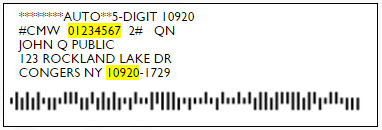
Before you start, please find a recent issue of Commonweal - it will have your print subscription account number on the front cover.
1. Are you logged into the Commonweal website?
If you see “My Account” in the upper right corner of the home page, you’re logged in and can skip to #3 below. If not, please proceed to #2.
2. Are you registered on the site with an email address and password?
If yes, please click “Sign In” at the top right of the home page and use your email address and password to log in.
If no, or you’re not sure, click “Sign In” at the top right of the home page and click the link “Create New Account.” Follow the prompts for creating a new account. You’ll be asked if you have a Commonweal account number as part of this process.
3. Are you logged into the site, and still seeing messages limiting the number of stories you can read?
This means that your website account isn’t successfully connected to your print subscription record, or that your print subscription may have expired.
First, click “My Account” at the top right of the home page. (If you don’t see “My Account,” it means you’re not logged in. See #1 above.)
Second, click the “Edit” button so that you can see more of the details of your site registration. Scroll down to the field that says “Account Number” - if it is blank, please enter the Commonweal account number from your label and click “Save” at the bottom of the page.
If these steps do not resolve the issue, please contact us at [email protected] and we will research the problem for you. Please include your name and a brief description of your difficulty.